
TITLE: Spiderman poses
For 3DPF lab, i need to come up with one classic pose and two additional poses that spider man did / will do. Hence, this post will be about how i did my spider man poses with MAYA.
Pose 1
The picture of the pose that i am supposedly to do:

Screen shots:
Front view

The front view allow me to know how the spider man look like. It helps me to control more of the legs, hands and the shoulders position of the spider man.
Top view

I was taught that the top view is very important since it is to determined how well done my spider man pose is. Since my spider man pose is bending forward, the top view allow me to know whether the spider man is balancing well or falling off. Most importantly, the top view allow us to determine the center of gravity for the spider man.
Side view

The side view of the spider man is also very important since it allows me to understand more about the spine position. The spider man need to bend forward in order to look more realistic with his pose.
How did i bend the legs?

In order to allow my spider man legs to bend, i need to unlock the knee PV in order to rotate it to the appropriate direction. To rotate the legs, i just clicked on the PV and use the move tool to move it back or front.
How did I make sure that the knee PV is unlocked?
At the right panel there will be a controller. Under the controller, there will be a section called "Knee PV" change the value to 1 from 0. Hence, the cone-liked shape will be seen.
For example - Before moving

After moving

After moving the cone-liked shape forward with the move tool, the left leg of the spider man rotated forward. And this control allow us to have a more realistic pose for the spider man. The PV is really convenient in order to control the knee to the foot rotation. In order to bend the knees, we can just easily use the move tool and move it downwards from the leg control.
What's the most difficult thing to do for this pose?
The most difficult thing to do for this pose is the bending of legs and the shoulders. Since the shoulders plays an important part in helping the spider man to keep his stability. Besides, the bending of the legs was difficult as first since i'm use to the controllers of the rig. At first i thought i need to use the rotation tool to move the legs down. However, in order to move the legs, i need to use the move tool instead of the rotation tool. This is quite unexpected since the other parts of the body need the rotation tool in order to move. Hence, in this lab it is quite interesting since we are able to play around with the rig of a spider man.
The final render
Front view

Side view

Top view

Pose 2
Picture of Original Pose

Screenshots - MAYA
Front view

The front view allow me to control the position of the legs and the shoulders. Both of these play an important part in managing the pose. For example, should the shoulders be moving forward or backward and which of the legs should be in front or behind. Hence, i believe that both of these positions can make the pose more realistic and similar to how spider man did this pose.
Side View

The side view allow me to take control of the back of the spider man. In order to look similar to the pose, i need to make sure that the spider man is bending forward instead of hunching down. It also allow me to control the position of the right let to make sure that the spider man will not fall forward.
Top view

As usual, the top view allow me to determine the center of gravity of the spider man. This make it easier for me to see whether my spider man is bending too much forward. The top view always allow my spider man to achieve it's balance while doing the pose.
The most difficult thing to do in this pose is adjusting the legs and the shoulders.
My previous work

The leg doesn't seem to be bending down and it is totally different from the picture. I tried to play around the leg's controllers and it doesn't seem to work. Lastly, i tried to play around the waist controller and finally, the leg begin to bend towards what i wanted.
This was my final pose for my squatting pose. However, it is only similar to the picture of the original pose and not entirely identical and i hope this is fine since I've tried my best for this pose.
Final renders
Front view


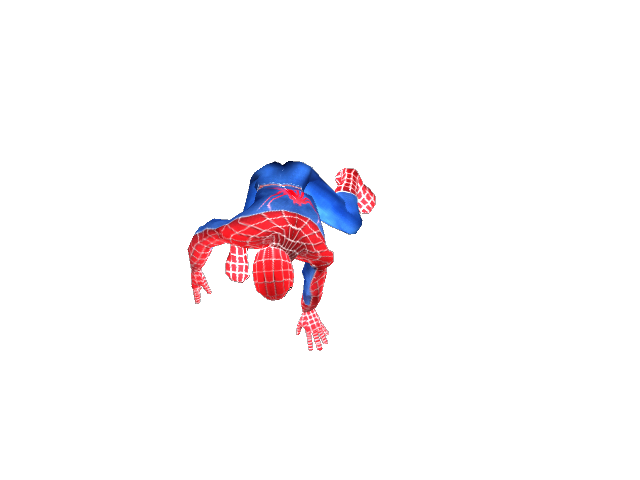
Classic Pose
Picture of original pose

Screenshots - MAYA
Front view

The front view allow me to control the spider man shoulders and the position of the legs. For example, how big should he open his legs in order to look like he is holding on to the spider web. Besides, the shoulders also play an important since it will make the spider man look more realistic in holding onto the spider web.
Side view

The side view allow me to focus more on the back of the spider man. For example, like how much should the spider man bend his back in order to look like he is holding on to the web.
Back view

What's the most difficult thing in doing this pose?
The most difficult thing in doing this pose is adjusting the legs, the back and shoulders. The legs need to open appropriately in order for the spider man to look comfortable while holding onto the spider web. Besides, the back need to be bend in an angle that the spider man will not look like he is hunching forward. Lastly, the shoulders are tough since we need to move forward or backward to look more realistic. If the shoulders are far too behind or too forward, it will look weird and uncomfortable for the spider man. Hence, we need to be precise on the angle for the shoulders for him to look really comfortable while holding on to the web.
Final render
Front view


In conclusion, this lab is interesting and i've learnt more on how to control and play around with rig given. It is not easy to make poses, it take a lot of time and effort to make these.
A summary of what i've learnt:
Controlling the grid with the move and rotate tool / Unlocking the PV's for different parts (e.g. knee PV)